
Opening a new profile on the mobile gaming platform is one of the first actions most Pakistani users take after installing the application. Whether you discovered the app through a friend, a social media post, or a search for setup instructions, this page provides a complete walkthrough of the account creation process updated for 2026. Every section below is written in plain English so that users in Lahore, Karachi, Islamabad, and smaller cities alike can follow along without confusion.
Registration connects your phone number to a secure wallet, unlocks the game lobby, and prepares your account for deposits, bonuses, and withdrawals. The process is designed to be quick, but understanding each step beforehand reduces errors, failed verification attempts, and unnecessary support tickets. Read through the full guide once before you begin, then return to specific sections if you encounter any issues during signup.
This resource is part of the broader 92Pak Play information portal, which covers downloads, payments, and platform updates for users across Pakistan. If you have not yet installed the application, complete the APK download and installation first, then return here to create your account.
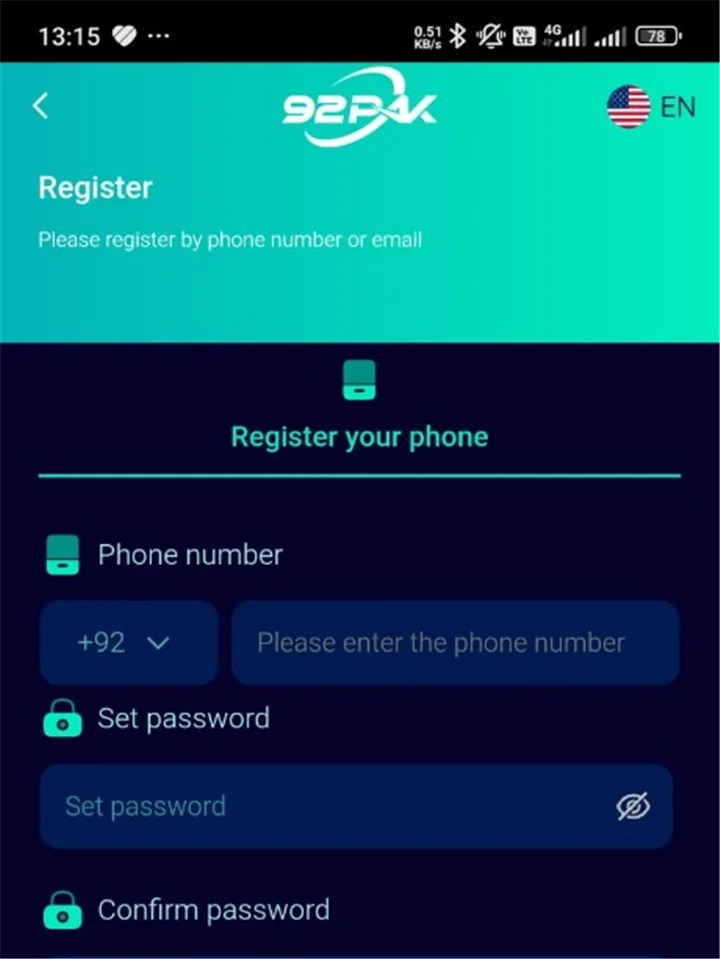
Registration Overview for Pakistani Users
Account creation on this platform follows a phone-first model. Your mobile number becomes the primary identifier for logging in, recovering passwords, and receiving transaction notifications. Unlike some international services that rely heavily on email addresses, the local approach reflects how most Pakistani users manage digital accounts through SIM-based verification.
The typical signup flow takes between two and five minutes when your device, network, and SIM card are working normally. You will enter a phone number, set a password, accept the terms of service, and confirm ownership through a one-time password sent via SMS. Optional fields such as referral codes or display names may appear depending on the app version installed on your phone.
Users who complete the 92Pak Register process gain immediate access to the main lobby, where game categories, wallet functions, and promotional banners are displayed. However, certain features — including withdrawals and some bonus claims — may require additional verification steps that happen after initial signup. Planning for those steps early helps you avoid delays when you are ready to cash out winnings or claim larger rewards.
What You Receive After Signup
- A unique account linked to your verified mobile number
- Access to the in-app wallet for balance management
- Entry to the game lobby and available entertainment categories
- Eligibility for welcome promotions after your first qualifying deposit
- A referral code you can share with friends once the feature activates
- Customer support access through in-app channels and the contact page
Before You Register
Preparation saves time. Before tapping the signup button, confirm that the application is correctly installed, updated, and able to connect to the internet. Attempting registration on an outdated build or an unstable connection is one of the most common reasons new users see error messages or miss OTP codes entirely.
Start by verifying that you downloaded the package from a trusted source. Our download guide explains how to obtain the official file and compare version numbers against the latest version listing. Installing from unverified third-party sites can result in modified software that fails during verification or exposes your credentials to unauthorized parties.
Next, confirm that your SIM card is active and able to receive standard text messages. Both prepaid and postpaid numbers from major Pakistani carriers generally work, but newly activated SIMs or numbers with SMS blocking enabled may experience delays. If you use a dual-SIM phone, decide which number you want permanently tied to the account, because switching numbers later usually requires support assistance and identity checks.
Pre-Registration Checklist
- Install the current APK build on a compatible Android device
- Connect to stable Wi-Fi or mobile data with adequate signal strength
- Prepare an active Pakistani mobile number with SMS capability
- Choose a password you have not used on other websites or apps
- Have a referral or invitation code ready if a friend shared one
- Read the platform terms of service and privacy policy summaries
- Ensure you meet the minimum age requirement stated in the terms
Device and Network Requirements
The registration screen renders on any device that meets the platform minimum specifications. For 2026 builds, Android 8.0 or higher is typically required, along with at least 2 GB of RAM and sufficient storage for the application and its cache files. Mid-range phones from Samsung, Xiaomi, Oppo, Vivo, and Tecno commonly used in Pakistan generally meet these thresholds without modification.
Network quality matters as much as hardware. SMS delivery for OTP codes depends on carrier routing, and data connectivity handles the server handshake that validates your entries. If you are in an area with weak signal, move closer to a window, switch from mobile data to Wi-Fi, or wait until coverage improves before starting registration. Repeated failed attempts in poor conditions can temporarily lock the signup form.
| Requirement | Minimum | Recommended |
|---|---|---|
| Operating System | Android 8.0 | Android 11.0 or newer |
| RAM | 2 GB | 4 GB or more |
| Free Storage | 150 MB | 300 MB including cache |
| Internet Connection | 3G stable | 4G or reliable Wi-Fi |
| SIM Status | Active with SMS | Primary personal number |
| App Version | Current 2026 build | Latest from official source |
Supported Number Formats
Enter your mobile number in the format the application requests. Most versions expect the Pakistani country code +92 followed by the number without the leading zero. For example, a number commonly written domestically as 03XX-XXXXXXX may be entered internationally as +923XXXXXXXXX. Double-check the digits before submitting, because an incorrect number sends the OTP to someone else or fails entirely.
Step-by-Step 92Pak Register Process
The following sequence reflects the standard signup flow in the 2026 application release. Minor label changes or additional fields may appear in future updates, but the core steps — phone entry, password creation, terms acceptance, and SMS verification — remain consistent across recent versions.
Step 1: Open the Application
Launch the app from your home screen or app drawer after installation completes. The welcome screen typically presents two primary options: one for existing users to sign in and another for new users to create an account. Select the registration or sign-up button to proceed. If the app prompts you to update before continuing, follow the on-screen instructions or visit the latest version page rather than attempting signup on obsolete software.
Step 2: Enter Your Mobile Number
The registration form asks for your phone number as the primary account identifier. Type carefully, confirming the country code and each digit. Some interfaces separate the +92 prefix into a fixed field while others require the full international format in a single input box. Avoid using landline numbers, virtual SMS services, or temporary numbers, because the platform validates ownership through carrier-delivered text messages.
Step 3: Create and Confirm Your Password
Choose a password that meets the minimum length and complexity rules displayed on screen. Most builds require at least six to eight characters, sometimes encouraging a mix of letters and numbers. Enter the password twice if the form includes a confirmation field. Store your credentials in a secure password manager or written record kept in a private location — not in a screenshot shared through messaging apps.
Step 4: Accept Terms and Policies
Before proceeding, you must acknowledge the terms of service and privacy policy. These documents outline age restrictions, account usage rules, payment policies, and data handling practices. While the full legal text is available on our terms page, the key takeaway for new users is that one account per phone number is permitted and responsible gaming practices are expected.
Step 5: Complete SMS Verification
After submitting the form, the platform sends a one-time password to your phone via SMS. Enter the code within the time limit shown on screen — usually between three and ten minutes depending on the version. If the code expires, use the resend option rather than restarting the entire registration from scratch. Successful verification confirms that you control the number and completes the core signup process.
Step 6: Optional Profile Details
Some versions prompt you to add a display name, avatar, or referral code immediately after verification. These fields are often optional and can be updated later in account settings. If a friend provided an invitation code, enter it during this stage to link both accounts for referral reward programs described on our bonus information page.
Step 7: Enter the Main Lobby
Once verification succeeds, you are directed to the main interface. From here you can explore available games, review wallet options, and configure basic settings. Your account is active, though certain financial features may guide you through additional prompts before processing deposits or withdrawals.
- Open the app and tap Register or Sign Up
- Enter your mobile phone number with country code +92
- Create a secure password meeting minimum length requirements
- Confirm password and accept terms of service
- Enter the SMS verification code received on your phone
- Complete optional profile details and referral code if prompted
- Enter the main lobby — your account is active
Phone Verification and OTP Explained
SMS verification exists to prove that the person creating the account actually possesses the phone number being registered. This layer reduces fraudulent account creation, protects the referral reward system, and ensures password recovery messages reach the legitimate owner. For Pakistani users accustomed to OTP flows on banking and e-commerce apps, the process will feel familiar.
When you request a code, your carrier routes the message through its network to your device. Delivery typically occurs within seconds, though congestion during peak hours or regional network maintenance can extend wait times to several minutes. If you do not receive a code, wait the full recommended interval before tapping resend, because multiple rapid requests may trigger temporary throttling.
OTP Best Practices
- Never share verification codes with anyone, including people claiming to be support staff
- Do not post screenshots of OTP messages on social media
- Ensure your phone inbox is not full, which can block incoming SMS on some devices
- Disable airplane mode and confirm mobile data or Wi-Fi is active for the app session
- Check whether SMS filtering apps are blocking messages from unknown senders
- Contact your carrier if SMS fails consistently across multiple services
If verification fails repeatedly despite following these steps, note the exact error message and consult the troubleshooting section below or reach out through the support contact page. Include your device model, app version, and carrier name to help agents diagnose the issue faster.
Creating a Secure Password
Your password protects access to your wallet balance, personal settings, and gaming history. Weak passwords — such as sequential numbers, repeated characters, or common words — are vulnerable to guessing attacks, especially if someone knows personal details about you. Treat your gaming account credentials with the same seriousness you apply to mobile banking or email.
A strong password combines length with unpredictability. Consider using a passphrase made from unrelated words plus numbers, or let a reputable password manager generate a random string. Avoid reusing passwords from other platforms, because a breach elsewhere could compromise this account if credentials are shared.
Password Do's and Don'ts
| Recommended | Avoid |
|---|---|
| At least eight characters with mixed character types | Your phone number or date of birth |
| Unique password used only for this account | Simple sequences like 123456 or abcdef |
| Password manager storage on personal devices | Sharing credentials with friends or agents |
| Periodic updates after suspected exposure | Writing passwords on easily lost paper in public |
| Biometric login after initial password auth | Using the same PIN as your JazzCash or Easypaisa |
After registration, you can change your password at any time through account settings. If you forget it later, the recovery flow on the login page sends a reset code to your registered number. Keeping that phone number active and accessible is therefore essential for long-term account access.
Using Referral and Invitation Codes
Referral programs reward users who invite others to join the platform. When you register with a valid invitation code from an existing member, both parties may receive bonus credits according to the promotion terms active at the time. These rewards typically appear after the new user completes qualifying actions such as a first deposit or minimum gameplay threshold.
Referral codes are usually entered during signup or within a limited window afterward. Missing that window does not prevent account creation, but you may lose the associated bonus permanently. Ask the person who invited you for their current code rather than copying outdated codes from old social media posts, because promotions change and expired codes simply fail validation.
How Referral Rewards Work
- An existing user shares their unique invitation code with you
- You enter the code during registration or in the designated post-signup field
- The system links your new account to the referrer's profile
- Both accounts become eligible for rewards once conditions are met
- Bonus credits appear in the wallet or promotions section per current terms
Full details about reward amounts, wagering requirements, and expiration dates are listed on our bonus page. Referral incentives complement other programs such as welcome deposits and daily check-in rewards, giving new users multiple paths to build an initial balance. Always read the specific terms attached to each offer before assuming funds are immediately withdrawable.
Profile Setup After Signup
Beyond the mandatory phone and password fields, the platform may invite you to personalize your profile. Display names appear in leaderboards, friend lists, and chat features where available. Choose a name you are comfortable sharing publicly within the app community, avoiding personal identifiers such as your full legal name or home address.
Avatar or profile picture uploads, where supported, should follow community guidelines. Some versions also allow binding an email address for secondary recovery options. Email binding is optional during initial registration but can simplify communication if you change phone numbers in the future. Check account settings after your first session to see which optional fields your build supports.
Recommended Post-Signup Settings
- Review notification preferences for deposits, withdrawals, and promotions
- Enable biometric login on personal devices if the feature is available
- Set deposit limits or session reminders if responsible gaming tools are offered
- Verify that your display name and avatar appear correctly in the profile section
- Locate your own referral code to share with friends after eligibility activates
- Bookmark the FAQ page for quick answers to common questions
What to Do After Registration
Completing signup is the beginning of your platform experience, not the end. The actions you take in the first hour influence how smoothly deposits, bonus claims, and future withdrawals proceed. Rather than rushing into gameplay immediately, spend a few minutes orienting yourself with the interface and wallet functions.
Start by exploring the game lobby without placing large bets. Familiarize yourself with navigation menus, balance displays, and how individual games load on your device. Performance varies slightly across phone models, and understanding load times helps you avoid accidental taps during transitions.
When you are ready to fund your wallet, visit our deposit guide for current payment methods, minimum amounts, and processing times for JazzCash, Easypaisa, and bank transfer options available in Pakistan during 2026. Welcome promotions often activate upon your first qualifying deposit, so review bonus terms before choosing an amount.
First-Session Action Plan
- Confirm your balance reads zero or shows any signup credits clearly labeled
- Navigate through two or three game categories to test performance
- Open wallet settings and note available deposit and withdrawal channels
- Make a modest first deposit if you plan to claim welcome rewards
- Check the promotions tab for active offers tied to new accounts
- Save your login credentials securely for future sessions
- Review withdrawal requirements on the withdrawal guide before accumulating large balances
Returning users simply need the login process with the phone number and password created during registration. Keep the app updated through official channels so that login, payment, and security features remain compatible with server-side changes throughout the year.
Common Registration Problems and Solutions
Even straightforward signup flows occasionally produce errors. Most issues fall into a handful of categories: network failures, incorrect input, outdated software, or policy restrictions such as duplicate accounts. Identifying which category applies to your situation directs you to the correct fix without unnecessary delays.
Document any error codes or messages exactly as shown. Support teams diagnose problems faster when users provide precise text rather than general descriptions like "it did not work." The table below covers the registration issues reported most frequently by Pakistani users in 2026.
| Problem | Likely Cause | Solution |
|---|---|---|
| OTP not received | Weak signal or SMS block | Improve coverage, check inbox space, wait five minutes, then resend |
| Number already registered | Previous account on same SIM | Use login instead or contact support for recovery |
| Invalid number format | Missing country code or extra zero | Re-enter as +92 followed by digits without leading zero |
| App crashes on signup | Outdated or corrupted install | Reinstall from official source via download page |
| Verification timeout | Delayed SMS delivery | Request new code; do not reuse expired OTP |
| Referral code rejected | Expired or mistyped code | Confirm current code with referrer; check bonus terms |
| Registration button greyed out | Terms checkbox unchecked or fields incomplete | Review all required fields and accept policies |
| Server error message | Temporary maintenance or congestion | Wait fifteen minutes and retry during off-peak hours |
When to Contact Support
Self-service troubleshooting resolves most signup issues. Contact official support when your number is incorrectly flagged as already registered despite never completing signup, when OTP fails for more than twenty-four hours across multiple networks, or when error messages reference account suspension or policy violations you do not understand. Provide your phone number, device details, and screenshots if requested, but never send passwords or OTP codes through unofficial channels.
Account Security Essentials for New Users
Security responsibility begins at registration. The platform implements server-side protections, but users must complement those measures with sensible habits on their devices. Pakistani users face the same phishing and social engineering tactics seen across digital services globally, including fake support accounts on WhatsApp and Telegram that request login credentials.
Official support will never ask for your password or OTP codes. Treat any such request as fraudulent regardless of how professional the message appears. Report suspicious contacts through the verified channels listed on the contact page and warn friends who might receive similar messages.
Security Checklist After 92Pak Register
- Enable screen lock on your phone with PIN, pattern, or biometric protection
- Decline requests to root or jailbreak devices used for financial transactions
- Install operating system security patches when your manufacturer releases them
- Log out after sessions on shared family phones or borrowed devices
- Monitor wallet activity and report unrecognized transactions immediately
- Download updates only from verified sources described in the version guide
For broader awareness of financial consumer protection in Pakistan, the Securities and Exchange Commission of Pakistan publishes educational resources about recognizing fraudulent schemes. While gaming platforms operate under different regulatory frameworks than securities markets, the general principles of verifying official channels and protecting personal data apply universally.
Age and Legal Requirements
Platform terms specify a minimum age for account holders, typically eighteen years or older. By completing registration and accepting the terms of service, you confirm that you meet this requirement. Parents and guardians should monitor minor access to gaming applications on family devices and enable device-level restrictions where appropriate.
One account per verified phone number is a standard policy across similar platforms. Attempting to create multiple accounts on the same number or using false identity information violates terms and may result in suspension of all associated profiles and forfeiture of balances. If you forgot credentials for an existing account, use recovery tools rather than registering again.
Users in Pakistan should also understand that online gaming regulations continue to evolve at the provincial and federal levels. Stay informed through official news sources and treat gaming expenditure as entertainment spending with defined personal limits. The about page provides additional context about this information portal and its purpose as an educational resource rather than an operator of the gaming service itself.
Registration vs Login: Key Differences
New users sometimes confuse the signup and sign-in screens, especially when reinstalling the application after a factory reset. Registration creates a new profile tied to a phone number that is not already in the system. Login accesses an existing profile using previously set credentials. Using the wrong option produces errors that are easily avoided once you understand the distinction.
| Aspect | Registration (Sign Up) | Login (Sign In) |
|---|---|---|
| Purpose | Create a new account | Access an existing account |
| Phone Number | Must not already be registered | Must match an existing profile |
| SMS OTP | Required to verify ownership | Sometimes required for security checks |
| Password | You create a new password | You enter your existing password |
| Referral Code | Optional field during signup | Not applicable |
| Result | New wallet and profile created | Previous balance and history restored |
| Guide Page | This registration guide | Login guide |
Registration Timeline and Milestones
Understanding how long each phase takes helps you plan registration during a stable internet session without interruptions. The timeline below assumes normal conditions on a compatible device with active SMS service in Pakistan.
| Step | Time Required | Notes |
|---|---|---|
| Download and install app | 2–5 minutes | See download guide |
| Complete registration form | 1–2 minutes | Phone, password, terms acceptance |
| SMS OTP delivery and entry | 30 seconds – 5 minutes | Depends on carrier network |
| Optional profile setup | 1–3 minutes | Display name, referral code, avatar |
| First lobby exploration | 5–10 minutes | Familiarize with navigation |
| First deposit | 1–5 minutes | JazzCash, Easypaisa, or bank transfer |
| Welcome bonus activation | Instant to 24 hours | Check bonus terms |
| Identity verification for withdrawals | 1–3 business days | See withdrawal guide |
Most users complete the core 92Pak Register flow in under five minutes. Extended timelines usually involve verification delays, referral bonus processing, or identity checks that occur later when you request your first withdrawal rather than during initial signup.
Frequently Asked Questions
Primary registration uses mobile phone numbers for identity and recovery. Email binding may become available afterward in account settings on supported versions, but it does not replace phone verification during initial signup.
Yes. Each mobile number can be linked to a single account per platform rules. If you already registered, use the login screen rather than attempting to create a duplicate profile.
Verify OTP timing, confirm number format with +92 country code, check internet stability, and ensure you are running the latest app version. Wait fifteen minutes between major retry attempts. Contact support if problems continue beyond twenty-four hours.
Phone number changes typically require identity verification through official support channels. Treat your registered number as permanent unless the platform offers a self-service change option in your account settings.
No. Referral codes are optional. Entering a valid code from an existing user may unlock bonus credits for both parties, but account creation proceeds normally without one.
Users must meet the minimum age stated in the terms of service, typically eighteen years or older. Accepting the terms during signup confirms you meet this requirement.
Common causes include weak network signal, full SMS inbox, airplane mode, SMS filtering apps, or incorrect number entry. Wait five minutes, then use the resend option. Verify the number format includes +92 without a leading zero.
The platform primarily targets Android users through APK distribution. iOS availability depends on regional releases and may differ from the Android experience described in this guide. Check official announcements for Apple device support.
Creating an account does not require payment. Standard SMS rates from your mobile carrier may apply for OTP delivery. Deposits are separate voluntary transactions made after signup when you choose to fund your wallet.
Most versions require a minimum of six to eight characters. The registration screen displays exact rules for your build. Using a longer password with mixed characters improves account security significantly.
Registration occurs inside the installed application. Complete the APK download and installation first using our download guide, then open the app to access the signup form.
Deposits are generally available immediately after successful verification and lobby access. Payment channels, minimum amounts, and any welcome bonus conditions are described on the deposit and bonus guide pages.
Invalid or expired codes are rejected without blocking registration. You can usually proceed without a code or request a corrected code from your referrer before completing signup, depending on whether the field is still editable.
Conclusion
Successful account creation depends on three foundations: a verified phone number, a strong unique password, and an up-to-date application installed from a trusted source. The 92Pak Register process is designed to be fast, but taking time to prepare your device, understand OTP verification, and review bonus terms before your first deposit prevents most common new-user frustrations.
After signup, explore the platform at your own pace, fund your wallet through supported local payment methods when you are ready, and keep security practices in mind throughout your experience. Return to the homepage for a full platform overview, or browse dedicated guides for login, deposits, and withdrawals as your needs grow. Responsible gaming starts with informed account setup — and this guide equips you with the knowledge to begin confidently in 2026.