
Getting help at the right time and through the right channel saves hours of waiting and prevents duplicate tickets from slowing down resolution for everyone. This contact page explains how Pakistani users in 2026 can reach the 92Pak Play information portal team for website-related questions, and when to switch to official in-app support for account, payment, and gameplay matters that require direct platform access. Whether you are in Karachi troubleshooting an APK installation, in Lahore checking whether a deposit guide step applies to your JazzCash wallet, or in Islamabad confirming withdrawal timelines before requesting your first payout, the guidance below helps you choose the correct path before you send a message.
92Pak Play operates as an independent information portal. We publish detailed guides on download, registration, login, deposits, withdrawals, bonuses, and app updates so users across Pakistan can navigate the platform confidently. We do not host gameplay servers, process wallet transactions, or hold user account credentials. That distinction matters because many support requests we receive are better handled inside the application itself, where trained agents can view your transaction history, verification status, and account flags in real time. Reading this page before contacting anyone ensures your inquiry reaches the team that can actually help.
The sections below cover response time expectations, subject categories for the contact form, self-service resources you should check first, a practical troubleshooting checklist, privacy practices when sharing information, and a comprehensive FAQ accordion addressing the questions users ask most often about support channels. Use the table of contents to jump directly to the topic you need, complete the relevant self-service steps, and then submit a clear, well-structured message if you still require assistance from the portal editorial team.
When to Contact the Portal vs In-App Support
Understanding the difference between this website and the live application support system is the single most important step before reaching out. Both channels exist to help users, but they serve different purposes and have different capabilities. Sending an account-specific payment dispute to the portal contact form will not produce a resolution because our editorial team cannot access backend systems. Conversely, contacting in-app support about a typo on a download guide page is inefficient when our portal team can update documentation directly.
When to Use This Information Portal
Contact the 92Pak Play portal team when your question relates to the educational content, guides, or general information published on this website. Appropriate portal inquiries include clarifications about steps described in our download walkthrough, suggestions for improving a guide section, reporting a broken link or outdated screenshot reference, questions about how to interpret platform policies explained in our articles, requests for additional topic coverage such as a new payment method guide, and feedback about the readability or accuracy of published material. We also handle media inquiries, partnership questions directed at the portal operators, and general questions about what this website does and does not provide.
Portal support is ideal for users who are still in the research phase — comparing guides before installing the app, verifying that a download source listed on our pages is official, or confirming whether a login troubleshooting step applies to the current app version. If your issue can be resolved by reading or correcting published information, start here. Our team reviews portal messages during business hours and aims to respond within forty-eight hours with either a direct answer or a pointer to the relevant guide section.
When to Use Official In-App Support
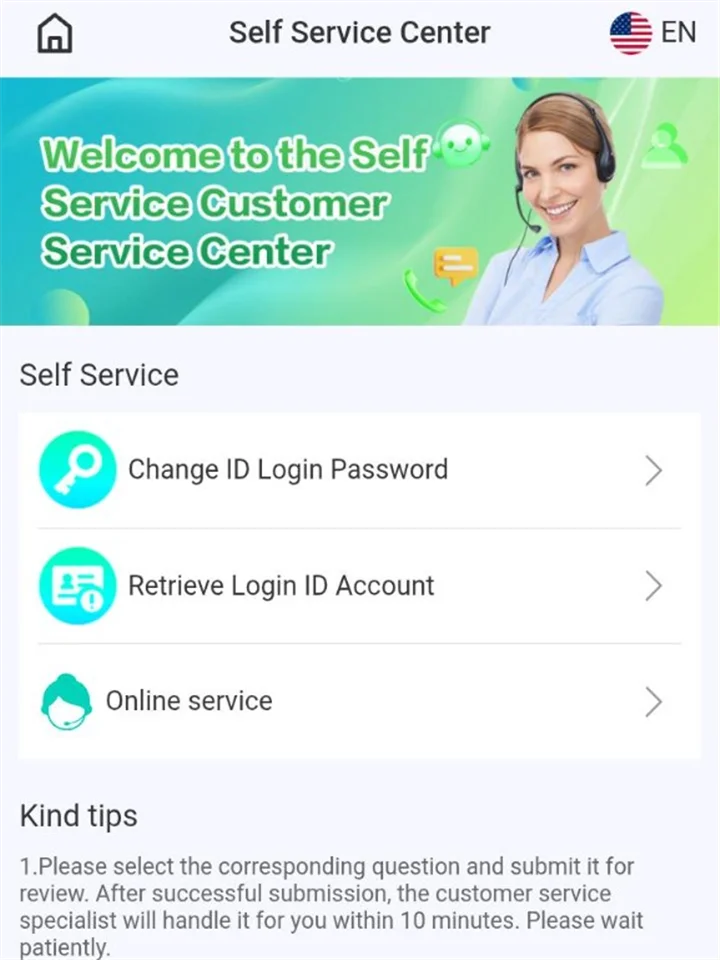
Switch to in-app support — accessible through the Self Service Customer Service Center shown in the screenshot above — whenever your issue requires access to your personal account, wallet balance, transaction records, verification documents, or gameplay history. In-app agents operate within the platform backend and can investigate deposit credits that never arrived, withdrawal requests stuck in pending status, account suspensions, bonus crediting errors, referral commission discrepancies, OTP delivery failures tied to your registered number, and suspected unauthorised account access. Open the app, navigate to the support or help section, and initiate a live chat or submit a ticket with your registered mobile number.
In-app support also handles requests that involve manual account changes, such as updating a registered phone number after SIM replacement, resolving name mismatches between your platform profile and JazzCash or Easypaisa wallet, appealing verification document rejections, and escalating fraud reports. These actions require identity confirmation steps that only platform operators can perform. If you are unsure whether your issue is account-specific, ask yourself: would solving this require someone to look up my user ID or transaction ID? If yes, use in-app support.
What Each Channel Cannot Do
Setting clear boundaries prevents frustration on both sides. The portal team cannot log into user accounts, reverse deposits or withdrawals, issue refunds, reset passwords on your behalf, override bonus wagering calculations, remove account suspensions, or provide real-time status updates on pending transactions. We cannot see whether your JazzCash payment cleared on the platform side. In-app support cannot edit website guide content, fix broken links on this portal, or answer questions about articles we have not yet published. Neither channel can help with issues on third-party websites, unofficial APK mirrors, or Telegram groups claiming to represent the platform.
Expected Response Times in 2026
Response times vary by channel, inquiry complexity, and current request volume. Setting realistic expectations helps you plan follow-up actions and avoid sending duplicate messages that slow overall queue processing. The timelines below reflect typical performance during standard operating periods in Pakistan. Delays may occur during Eid holidays, Ramadan evenings with reduced staffing, major app update rollouts, or widespread network outages affecting Jazz, Zong, Telenor, or Ufone infrastructure.
Portal Contact Form Timeline
Messages submitted through the contact form on this page receive a first response within forty-eight hours during weekdays. Simple guide clarification requests often receive answers within twelve to twenty-four hours. More complex editorial questions — such as requests to verify whether a policy described in an article still matches the current app version — may require additional research and can take up to seventy-two hours. We respond via the email address you provide in the form. Check your inbox and spam folder if you do not see a reply within two business days. Sending the same message multiple times creates duplicate tickets and does not accelerate processing.
In-App Chat and Ticket Processing
Live chat within the application typically connects you to an agent within five to fifteen minutes during published service hours, which generally span morning through late evening Pakistan Standard Time. Outside service hours, chat may switch to a ticket queue with responses arriving within four to twelve hours. Payment-related tickets that require manual reconciliation — such as deposits deducted from JazzCash but not credited to your gaming wallet — may take twenty-four to forty-eight hours for full resolution even after initial agent contact. Withdrawal investigations can extend to seventy-two hours when verification checks are involved. Track status through push notifications and the ticket history section inside the app.
Factors That Affect Resolution Speed
Several variables influence how quickly your issue is resolved regardless of channel. Complete messages with registered mobile numbers, transaction IDs, screenshots of error messages, and clear descriptions of steps already attempted reach resolution faster than vague reports such as "payment not working." Issues submitted during peak evening hours when most Pakistani users are active may experience longer chat wait times. First-time withdrawal or verification cases inherently take longer because additional identity checks are mandatory. Public holidays and weekend staffing reductions can add one to two business days to portal responses. Network instability on your end that prevents agents from confirming live account status during chat sessions may require you to reconnect later.
| Channel | First Response | Typical Full Resolution | Best For |
|---|---|---|---|
| Portal contact form | 24–48 hours (weekdays) | 1–3 business days | Guide questions, site feedback |
| In-app live chat | 5–15 minutes (service hours) | Minutes to 48 hours | Account access, quick clarifications |
| In-app support ticket | 4–12 hours | 24–72 hours | Payments, withdrawals, verification |
| Emergency account freeze | Priority queue | 1–24 hours | Suspected fraud or unauthorised access |
Contact Subject Categories Explained
The contact form includes a subject dropdown that routes your message to the appropriate reviewer on the portal team. Selecting the correct category reduces internal forwarding delays and helps us provide a relevant answer on the first reply. Review the category descriptions below before submitting. If your question spans multiple topics, choose the primary category and mention secondary topics in your message body.
| Form Subject | Use When | Example Questions | Redirect If |
|---|---|---|---|
| General Inquiry | Broad questions about the portal or platform overview | What guides do you offer? Is this the official website? | Account or payment issues → in-app support |
| Download Help | APK installation, update, or device compatibility per our guides | Parse error during install, unknown sources setting location | Account locked after install → in-app support |
| Account Question | Registration or login steps described on portal pages | OTP not arriving during registration flow from guide | Password reset on live account → in-app support |
| Payment Question | Deposit or withdrawal process explained in our articles | Which guide step covers Easypaisa QR deposits? | Missing deposit credit → in-app support with txn ID |
| Other | Feedback, corrections, media, or topics not listed above | Report outdated version number on a guide page | Gameplay disputes → in-app support |
General Inquiry Messages
Choose General Inquiry when your question does not fit neatly into download, account, or payment categories. Users often select this option when asking whether 92Pak Play is affiliated with the application developer, requesting a list of available guides, seeking clarification about responsible gaming articles, or asking how often portal content is updated. We welcome constructive feedback about overall site usability through this category as well.
Download Help Messages
The Download Help category covers everything related to obtaining and installing the Android application as described on our download guide. Message us here if a guide step does not match what you see on your device screen, if you need clarification about enabling Install Unknown Apps on a specific Android skin such as MIUI or ColorOS, or if you want confirmation that a file size or version number on our latest version page is current. We cannot remotely install the APK on your device or verify file integrity of downloads from unofficial third-party sources.
Account Question Messages
Account Question applies to registration and login guidance published on our registration and login pages. Appropriate messages include confusion about a specific guide step, questions about OTP timing as described in our articles, or requests to clarify whether the portal instructions match the current app interface. If you need an actual password reset, SIM change, or account unlock on a live profile, in-app support is required because those actions involve backend authentication systems we cannot access.
Payment Question Messages
Payment Question covers informational content about funding and cashing out published on our deposit and withdrawal guides. Ask us here when you need help understanding minimum amounts, fee descriptions, or step-by-step screenshots in those articles. If JazzCash or Easypaisa has already deducted funds but your in-app balance did not update, contact in-app support immediately with the wallet transaction ID — that is a live reconciliation issue, not a guide clarification.
Submit a Message to the Portal Team
Use the form below to contact the 92Pak Play information portal team. We respond to website-related inquiries within forty-eight hours on weekdays. For account, payment, or gameplay issues, please contact the official app support through the in-app chat feature shown in the screenshot above. Include enough detail in your message for us to answer without requesting follow-up information. Fields marked as required must be completed before submission.
Self-Service Alternatives Before You Contact Us
Many common questions are already answered in dedicated guides across this website. Checking self-service resources first resolves most issues within minutes and keeps support queues available for users who genuinely need manual assistance. The portal team maintains these guides specifically so you can find answers without waiting for an email reply. Work through the relevant resource below based on your topic before submitting the contact form or opening an in-app ticket.
FAQ — Quick Answers to Popular Questions
Our FAQ page collects the most frequently asked questions from Pakistani users in one searchable location. It covers platform overview, download safety, account registration, login recovery, JazzCash and Easypaisa deposits, withdrawal timelines, bonus wagering requirements, technical troubleshooting, security practices, and app update procedures. Each answer links to detailed guides where applicable. If your question matches a FAQ entry, the answer is immediate with no waiting period.
Download Guide — APK Installation Help
The download guide walks through every step of obtaining and installing the official Android package on Pakistani devices. It explains enabling unknown source installation, verifying file size against the current release, resolving parse errors, and avoiding counterfeit APK files distributed through unofficial channels. Users who contact support about installation failures before reading this guide often discover the solution — usually a corrupted download or disabled permission setting — within the first few sections.
Login Guide — Account Access Troubleshooting
Authentication problems are among the most common support topics. Our login guide addresses incorrect password errors, OTP delivery delays, login timeout messages on slow networks, biometric login setup, session management across devices, and account lockouts after multiple failed attempts. The guide includes a structured troubleshooting flowchart approach: verify credentials, check network stability, update the app, clear cache, and only then escalate to support with specific error text.
Deposit Guide — Payment Method Information
Funding questions frequently stem from unfamiliarity with JazzCash or Easypaisa merchant payment flows rather than actual gateway failures. The deposit guide documents supported methods, minimum and maximum amounts, expected processing times, fee structures, first-time depositor tips, and troubleshooting steps for delayed credits. Review the guide's comparison table to choose the payment channel that best fits your transaction size and urgency before contacting anyone about a failed attempt.
Withdrawal Guide — Cash-Out Process Details
First-time withdrawal requests generate significant support volume because verification requirements are not always obvious until users attempt a payout. The withdrawal guide explains minimum amounts, processing windows of twenty-four to seventy-two hours, name matching rules between platform accounts and mobile wallets, bonus wagering prerequisites, rejection reasons, and how to track request status inside the app. Reading this guide before submitting a withdrawal prevents many preventable rejections.
- FAQ page — quick answers to popular questions across all topics
- Download guide — APK installation and update walkthrough
- Login guide — account access and password recovery
- Deposit guide — JazzCash, Easypaisa, and bank transfer funding
- Withdrawal guide — cash-out process, limits, and verification
- Registration guide — creating a new account with SMS verification
- Latest version page — current release number and update instructions
- Bonus page — promotional offers and wagering requirements
Troubleshooting Checklist Before You Contact Support
Working through a structured checklist before reaching out resolves a significant percentage of reported issues and equips you with specific error details if escalation becomes necessary. Support agents — whether portal editors or in-app staff — can assist faster when you have already eliminated common causes. Select the checklist that matches your situation and complete every step in order before submitting a message.
Download and Installation Issues
- Confirm you are downloading from the official source linked on our download page, not a Telegram or YouTube link
- Verify the APK file size matches approximately fifty-two megabytes for the current v3.2.1 release
- Enable Install Unknown Apps permission for your browser in Android Settings → Security
- Ensure at least three hundred megabytes of free storage on your device
- Confirm Android version is 8.0 or higher under Settings → About Phone
- Delete any corrupted partial download and retry on a stable Wi-Fi connection
- If parse error persists, compare your installed version with our latest version page
Login and Account Access Issues
- Verify you are entering the correct registered mobile number in +92 format
- Confirm password caps lock is not enabled and check for accidental spaces
- Wait two full minutes for OTP delivery before requesting a new code
- Switch from 3G to 4G or Wi-Fi if you receive login timeout errors
- Update the app to the latest version and clear cache through Android Settings
- Review the full login guide troubleshooting section for your specific error message
- If locked out after failed attempts, use Forgot Password or wait for the lockout timer to expire
Deposit and Payment Issues
- Confirm sufficient balance in your JazzCash or Easypaisa wallet including provider fees
- Wait fifteen minutes after payment completion, then pull down to refresh the in-app wallet screen
- Check your mobile wallet transaction history to verify the deduction actually occurred
- Note the transaction ID from your wallet app before contacting support
- Do not submit a duplicate deposit for the same amount while the first is unresolved
- Review the deposit guide section on delayed credits for additional steps
- If funds were deducted but not credited after thirty minutes, open an in-app support ticket with the transaction ID
Withdrawal and Verification Issues
- Confirm your account verification is complete in the withdrawal section of the app
- Verify the name on your platform profile matches your JazzCash or Easypaisa account exactly
- Check whether active bonus wagering requirements remain before requesting a payout
- Ensure the withdrawal amount meets the minimum threshold described in our withdrawal guide
- Allow seventy-two hours for first-time withdrawals before escalating a pending request
- Read the rejection reason displayed in withdrawal history if a previous request failed
- Contact in-app support with your registered number and withdrawal reference if status is unchanged after seventy-two hours
General App Performance Issues
- Update to the latest APK version from the official download source
- Clear app cache without clearing app data to preserve login session
- Restart your device to free memory on budget handsets with two gigabytes of RAM
- Close background applications consuming network or processing resources
- Test on an alternate network to rule out carrier-specific routing problems
- Check the FAQ technical section for crash and loading issue solutions
Privacy and Security When Messaging Support
Protecting your personal information during support interactions is essential. Both legitimate support channels and fraudulent actors target users who share credentials carelessly. Understanding what to include in a message — and what to withhold — keeps your account secure while still giving agents enough context to help. Review the guidelines below before every support contact, whether through this portal form or in-app chat.
What Information Is Safe to Share
When contacting the portal team, share your name, email address, a clear description of your guide-related question, the device model and Android version if relevant to a download issue, and links to specific pages where you found confusing content. When contacting in-app support, provide your registered mobile number, the date and approximate time of the issue, transaction IDs from JazzCash or Easypaisa for payment matters, withdrawal reference numbers, screenshots of error messages with personal details cropped if possible, and a step-by-step account of what you attempted before escalating. This information helps agents locate your records quickly without exposing unnecessary personal data.
What You Should Never Send
Never share your account password, full CNIC or national ID number in unsecured chat unless explicitly requested through an official verified channel, one-time passwords or SMS verification codes, banking PINs or JazzCash/Easypaisa MPINs, screenshots showing complete payment card numbers, or remote access to your device. Legitimate support staff — on this portal or inside the app — will never ask for your password or OTP codes. If anyone claiming to be support requests these items through WhatsApp, Telegram, Facebook groups, or unofficial phone numbers, refuse and report the interaction through official channels. Scammers frequently impersonate gaming platform support to harvest credentials from unsuspecting users.
How Portal Messages Are Handled
Messages submitted through this contact form are reviewed by the portal editorial team and stored securely for response tracking. We use your email address solely to reply to your inquiry and do not add it to marketing lists without consent. Message content may be referenced internally to improve guide quality but is not sold to third parties. For complete details on data handling across this website, review our privacy policy. In-app support conversations are governed by the platform operator's own privacy terms, which you accepted during registration.
Reporting Suspicious Contact Attempts
If someone contacts you claiming to be 92Pak Play support and asks for credentials, payment transfers to personal accounts, or upfront fees to release withdrawals, treat it as fraud. Official support never requests direct transfers to individual JazzCash or Easypaisa numbers outside the verified in-app payment gateway. Report suspicious approaches through in-app support so the security team can investigate and warn other users. Share the phone number, social media profile, or message screenshots that evidence the impersonation attempt.
Writing an Effective Support Message
The quality of your initial message directly affects how quickly and accurately support teams respond. Vague reports require back-and-forth clarification that adds hours or days to resolution. A well-structured message often resolves portal questions in a single reply and gives in-app agents the context they need to investigate payment or account issues immediately.
Include these elements in every support message regardless of channel:
- Subject line or category: Select the most accurate form category or chat topic
- Registered mobile number: Required for any in-app account issue (+92 format)
- Issue summary: One sentence describing the core problem
- Timeline: When the issue started and whether it is ongoing or intermittent
- Steps attempted: List troubleshooting actions you already completed
- Error messages: Exact text or screenshot of any error displayed
- Transaction references: Wallet transaction IDs or withdrawal reference numbers for payment issues
- Device context: Phone model, Android version, and app version from Settings → About
Avoid emotional language, threats, or excessive repetition of the same question across multiple channels simultaneously. Submitting identical payment disputes to both the portal form and in-app chat creates duplicate records that may slow processing. Choose one channel based on the guidance in the support channels section above, send one complete message, and wait for the published response window before following up.
Frequently Asked Questions About Contact and Support
The accordion below answers the questions Pakistani users ask most often about reaching support, expected timelines, and channel selection. Expand any item for a detailed response. If your question is not covered here, submit the contact form or consult the main FAQ page for platform-specific topics.
This website is an independent information portal that publishes guides about download, login, deposits, withdrawals, and related topics. The portal team answers questions about guide content and website functionality. In-app support operates inside the live application and handles account-specific matters such as payment reconciliation, withdrawal processing, verification, and account security. If your issue requires someone to access your user account or transaction history, use in-app support. If you need clarification about a step described in our articles, use the contact form on this page.
We aim to respond to contact form messages within forty-eight hours on weekdays. Straightforward guide questions often receive answers sooner, within twelve to twenty-four hours. Complex editorial inquiries that require cross-checking against the current app version may take up to seventy-two hours. Responses are sent to the email address you provide. Check spam and promotions folders if you do not see a reply within two business days.
No. The portal team cannot access user accounts or perform authentication actions. Password resets must be initiated through the Forgot Password flow on the login screen, which sends an SMS OTP to your registered number. If that process fails, contact in-app support with your registered mobile number and identity details. Account unlocks after security lockouts are also handled exclusively through in-app support channels.
Contact in-app support immediately, not the portal contact form. Provide your registered mobile number, the JazzCash or Easypaisa transaction ID, the deposit amount, and the approximate time of payment. Portal editors cannot view wallet balances or trigger manual credit reconciliation. While waiting for support, do not submit a second deposit for the same amount. Review the delayed credit section of our deposit guide for interim troubleshooting steps.
Open the app and navigate to the help or support section, often labelled as Customer Service or Self Service Center. The screenshot on this page shows the typical interface. From there, you can start a live chat session during service hours or submit a support ticket for issues requiring investigation. Have your registered mobile number ready. For login issues preventing app access, try the Forgot Password flow on the login screen first, as described in our login guide.
Official support is available through this portal contact form and the in-app support center only. WhatsApp groups, Telegram channels, and Facebook pages claiming to offer 92Pak Play support are frequently operated by scammers seeking credentials or upfront payments. Never share your password, OTP codes, or MPINs with anyone contacting you through unofficial messaging platforms. Report impersonation attempts through in-app support.
Include your name, a valid email address, the correct subject category, a clear description of your guide-related question, the specific page URL where you encountered confusion, your device model and Android version if the issue involves installation steps, and any error messages you received. The more specific your message, the faster we can provide a useful answer without requesting additional details.
Common rejection reasons include incomplete verification, name mismatch between your platform profile and mobile wallet, unmet bonus wagering requirements, or amounts below the minimum threshold. Check the rejection reason in your withdrawal history inside the app. For case-specific investigation and appeals, contact in-app support with your registered number and withdrawal reference. Our withdrawal guide explains each rejection category and preventive steps in detail.
Support is provided through the contact form on this page and the in-app chat or ticket system. A direct phone support line is not listed because most account and payment issues require agents to view your profile and transaction records digitally. Written communication also creates a reference trail that helps track complex cases across multiple interactions. For urgent security matters such as suspected unauthorised access, use the priority option in in-app support if available.
Yes. Select the Other or relevant subject category in the contact form and describe the specific page, section heading, and outdated information you noticed. Include the current app version from Settings → About if the discrepancy involves version-specific steps. We appreciate correction reports and update guides regularly based on user feedback and platform changes throughout 2026.
Live chat is typically available during daytime and evening hours Pakistan Standard Time, often from mid-morning through late evening. Exact hours may vary during Ramadan, Eid holidays, and major maintenance windows. Outside live chat hours, the ticket system remains active and responses arrive within four to twelve hours. Check the support section inside the app for any published schedule updates specific to the current period.
Both the portal team and in-app support can assist in English. In-app support may also offer Urdu language assistance depending on agent availability. You may write your contact form message in either language. Clear communication matters more than language choice — use whichever language allows you to describe the issue most accurately, and include specific technical details such as error messages and transaction IDs regardless of language.
Conclusion
Effective support starts with choosing the right channel. Use this portal contact form for guide clarifications, website feedback, and informational questions about download, login, deposit, and withdrawal processes as described in our published articles. Switch to official in-app support for any issue that requires access to your account, wallet, transactions, or verification status. Checking self-service resources — the FAQ page, download guide, login guide, deposit guide, and withdrawal guide — resolves most questions before a message is needed.
When you do reach out, send a complete message with relevant details, respect published response timelines, and protect your credentials by never sharing passwords or OTP codes with anyone. The troubleshooting checklists and privacy guidelines on this page are designed to help Pakistani users in 2026 get faster, safer resolutions across every support scenario. Bookmark this page for future reference and explore the homepage for the full collection of platform guides updated throughout the year.