
Adding funds to your account wallet is the first practical step toward participating in games, tournaments, and promotional events on the platform. Whether you are a new user setting up your first transaction or an experienced player looking for clearer information about limits and processing times, this comprehensive 92Pak Deposit guide covers every detail relevant to Pakistani users in 2026. From JazzCash and Easypaisa integration to bank transfer options, security practices, and troubleshooting delayed credits, the sections below walk you through the entire funding process with practical advice you can apply immediately.
Mobile wallet adoption across Pakistan has transformed how users manage in-app payments. JazzCash and Easypaisa remain the most widely used channels for digital transactions, and the platform has designed its payment gateway to work seamlessly with both services. Understanding how deposits flow from your personal wallet into your gaming balance helps you avoid common mistakes, reduce waiting times, and maintain a clean transaction history that supports smooth withdrawals later. Read through each section carefully, bookmark this page for future reference, and consult the FAQ at the bottom if you encounter a specific issue.
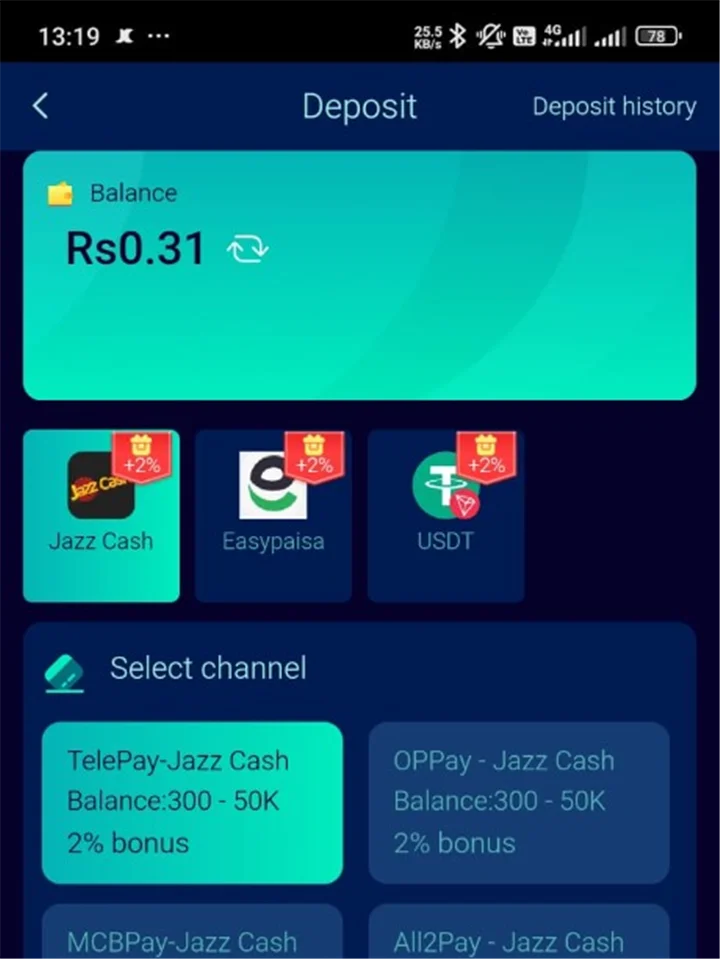
What Is 92Pak Deposit and How Does It Work?
A 92Pak Deposit is the process of transferring Pakistani Rupees from your personal payment account—such as JazzCash, Easypaisa, or a linked bank account—into your in-app gaming wallet. Once credited, these funds become available for gameplay, entry fees, and participation in platform features. The deposit system operates through a secure payment gateway that communicates with mobile wallet providers and banking networks to confirm each transaction before updating your balance.
The workflow follows a straightforward pattern. You initiate a deposit request inside the app, specify an amount within the allowed range, and select your preferred payment method. The gateway generates a payment prompt that redirects you to your wallet app or displays account details for manual transfer. After you confirm the payment on your end, the gateway receives a confirmation signal and credits your gaming wallet. For JazzCash and Easypaisa, this typically happens within seconds. Bank transfers may require additional verification and can take several hours depending on banking hours and network load.
Your deposit history is stored in the transaction log within the app. Each entry includes the date, amount, payment method, and a unique reference number. Keeping track of these reference numbers is essential when contacting support about delayed or missing credits. The platform generally matches deposits to accounts using the registered mobile number and user ID, so ensure your account profile reflects accurate contact information before making your first payment.
Why Mobile Wallets Dominate in Pakistan
Mobile financial services have become the backbone of digital payments across urban and rural Pakistan. JazzCash, operated by Jazz, and Easypaisa, operated by Telenor Microfinance Bank, together serve tens of millions of active wallet holders. Their widespread agent networks, USSD access for feature phones, and smartphone apps make them accessible to users regardless of banking status. For in-app transactions, mobile wallets offer speed, convenience, and familiar interfaces that reduce friction compared to traditional bank transfers.
From a technical standpoint, wallet integrations use merchant payment APIs that allow the gaming platform to request a specific amount and receive instant confirmation once the user approves the transaction in their wallet app. This real-time settlement is why most JazzCash and Easypaisa deposits appear in your gaming balance within one minute. Bank transfers, by contrast, rely on interbank clearing systems that operate on business-day schedules and may involve manual reconciliation during peak periods.
Before You Make Your First Deposit
Completing a few preparatory steps ensures your first funding attempt succeeds without unnecessary delays. Many deposit issues stem from incomplete account setup rather than payment gateway failures. Addressing these items beforehand saves time and prevents frustration.
Account Registration and App Installation
You must have an active account before depositing. If you have not yet signed up, visit our registration page for step-by-step instructions on creating your profile, verifying your mobile number, and setting a secure password. After registration, install the latest application version from our download page to ensure you have the most current payment interface and security patches. Outdated app versions occasionally display deprecated payment screens that no longer connect to the gateway correctly.
Login and Wallet Section Access
Once your account exists and the app is installed, log in using your registered credentials. Navigate to the Wallet or Deposit section from the main menu. This area displays your current balance, deposit options, transaction history, and any active promotional offers tied to funding. Familiarize yourself with the layout before entering payment details so you can confirm amounts and methods accurately.
Payment Account Readiness
Ensure your JazzCash or Easypaisa wallet has sufficient balance to cover the deposit amount plus any provider transaction fees. Both services may charge a small fee for merchant payments depending on your account type and transaction size. Check your wallet balance and fee schedule in the respective app before initiating a deposit. For bank transfers, confirm you have the correct beneficiary account details displayed in the deposit screen and that your bank allows outbound transfers to the listed account.
- Complete account registration with a verified mobile number
- Install the latest app version from the official download source
- Log in and locate the Wallet or Deposit section
- Confirm sufficient balance in your chosen payment wallet
- Use a payment account registered in your own name
- Connect to a stable internet connection before starting
Supported 92Pak Deposit Methods for Pakistan
Pakistani users most commonly rely on mobile wallet services for in-app transactions. JazzCash and Easypaisa integrate directly with the platform payment gateway, offering near-instant credit to your gaming wallet. Bank transfer options may appear for larger amounts depending on current server configuration and account verification status. The table below summarizes the primary methods available in 2026.
| Method | Speed | Min Amount | Max Amount | Best For |
|---|---|---|---|---|
| JazzCash | Instant | PKR 500 | PKR 50,000 | Quick daily top-ups |
| Easypaisa | Instant | PKR 500 | PKR 50,000 | Quick daily top-ups |
| Bank Transfer | 1–24 hours | PKR 1,000 | Varies | Larger single deposits |
JazzCash Deposits
JazzCash remains one of the most popular funding channels among Pakistani platform users. To deposit via JazzCash, select it from the payment method list, enter your desired amount, and tap confirm. The app opens JazzCash or displays a payment request that you approve using your JazzCash PIN or biometric authentication. Upon successful approval, the gateway receives confirmation and credits your wallet. Most JazzCash deposits complete in under sixty seconds during normal operating conditions.
Keep your JazzCash app updated to the latest version available on the Google Play Store or Apple App Store. Older versions occasionally fail to process merchant payment requests. If you use JazzCash through USSD on a feature phone, ensure your SIM is registered for mobile account services and that you know your MPIN. USSD-based payments follow the same gateway flow but require manual confirmation through the dial-code interface.
Easypaisa Deposits
Easypaisa offers a comparable experience with equally fast processing times. Select Easypaisa as your payment method, specify the amount, and confirm the transaction. The Easypaisa app prompts you to authorize the payment. Once authorized, your gaming balance updates automatically. Easypaisa users should verify that their account is fully registered and not restricted due to inactivity or incomplete KYC documentation, as restricted accounts cannot process outbound merchant payments.
Both JazzCash and Easypaisa support transaction receipts that include a reference number, timestamp, and merchant name. Save or screenshot these receipts after each deposit. They serve as proof of payment if a credit delay occurs and you need to contact support with documentation.
Bank Transfer Deposits
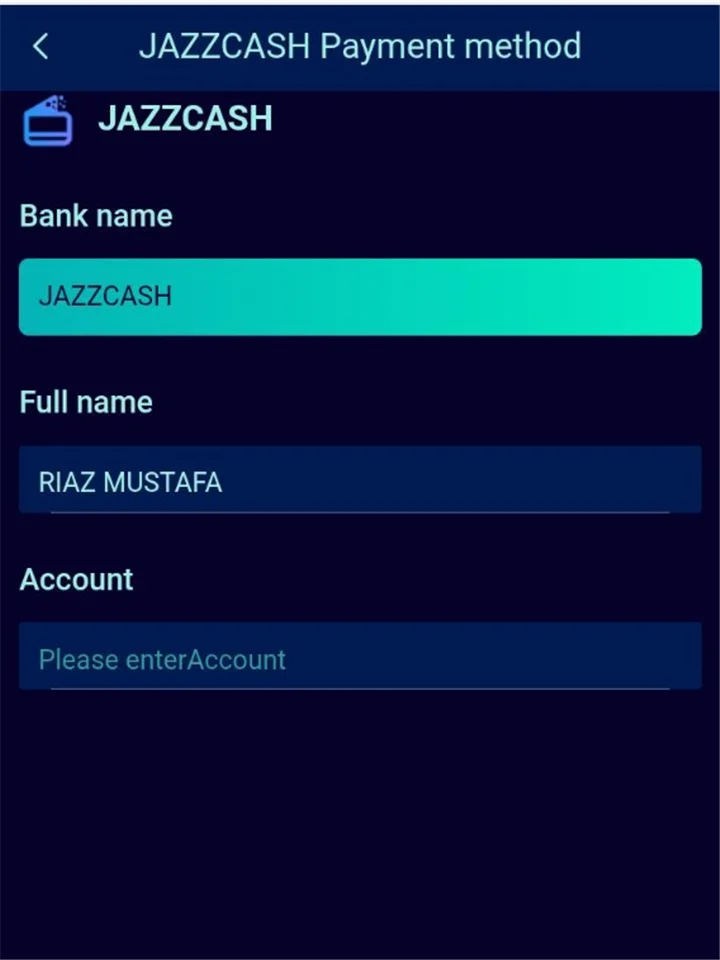
Bank transfer may be available for users who prefer traditional banking channels or need to deposit amounts exceeding mobile wallet limits. When you select bank transfer, the app displays beneficiary account details including bank name, account title, and account number. Transfer the exact amount from your bank app or branch, and include any reference code shown on the deposit screen in the transfer description field. This reference helps the finance team match your payment to your account during manual reconciliation.
Bank transfer deposits typically process within one to twenty-four hours on business days. Transfers initiated on weekends or public holidays may not be processed until the next working day. Unlike mobile wallet deposits, bank transfers require manual verification, so allow extra time before assuming a transaction has failed.
How to Make a 92Pak Deposit Step by Step
Follow this detailed walkthrough to complete a deposit from start to finish. These steps apply to JazzCash and Easypaisa; bank transfer includes an additional verification waiting period described in the bank transfer section above.
- Log in to your account. Open the app and enter your registered mobile number and password. If you experience access issues, consult our login guide for troubleshooting tips.
- Navigate to the Wallet or Deposit section. This section is typically accessible from the bottom navigation bar or the main menu. Your current balance appears at the top of the screen.
- Tap Deposit or Add Funds. The deposit interface displays available payment methods and any active promotional banners tied to funding.
- Select your preferred payment method. Choose JazzCash, Easypaisa, or bank transfer based on your needs and available balance.
- Enter the deposit amount. Type an amount within the minimum and maximum limits for your selected method. The app may display estimated processing time and any applicable fees.
- Review and confirm the transaction. Double-check the amount and payment method before proceeding. Errors at this stage can cause mismatched credits that require support intervention.
- Authorize payment in your wallet app. For JazzCash or Easypaisa, approve the merchant payment request using your PIN, fingerprint, or face recognition.
- Wait for balance update. Mobile wallet deposits usually reflect within one minute. Pull down to refresh your balance if it does not update immediately.
- Verify the transaction in your history. Open transaction history to confirm the deposit appears with the correct amount and a reference number.
What to Do After a Successful Deposit
After your balance updates, you can immediately use the funds for gameplay or save them for later sessions. If you claimed a deposit-linked bonus, check the bonus section to confirm promotional credits were applied according to the offer terms. Review any wagering requirements associated with bonus funds on our bonus page before planning a withdrawal, as unmet requirements can block cash-out requests.
Deposit Limits, Fees, and Account Tiers
Understanding limits and fees helps you plan deposits efficiently and avoid rejected transactions. The platform sets minimum and maximum thresholds to comply with payment provider rules and internal risk management policies. These limits may vary based on your account verification level and transaction history.
Minimum and Maximum Amounts
Minimum deposits typically start at PKR 500 for JazzCash and Easypaisa. Bank transfer minimums are generally PKR 1,000. Maximum single-transaction limits for mobile wallets commonly reach PKR 50,000, though your wallet provider may impose its own caps independent of the platform. Daily deposit limits may apply based on account verification status—unverified accounts often face lower daily caps than fully verified profiles.
| Limit Type | JazzCash / Easypaisa | Bank Transfer |
|---|---|---|
| Minimum per transaction | PKR 500 | PKR 1,000 |
| Maximum per transaction | PKR 50,000 | Varies by bank |
| Daily deposit cap (standard) | PKR 100,000 | PKR 200,000 |
| Daily deposit cap (verified) | PKR 500,000 | PKR 1,000,000 |
Platform and Provider Fees
The platform generally does not charge deposit fees for standard mobile wallet transactions. However, JazzCash and Easypaisa may apply their own merchant payment charges depending on your account tier and transaction size. These provider fees are deducted from your wallet balance at the time of payment, not from your gaming wallet after credit. Bank transfers may incur interbank transfer fees charged by your financial institution. Always review the fee summary displayed in your wallet app before confirming payment.
Verification and Higher Limits
Users who complete identity verification often receive access to higher daily deposit and withdrawal limits. Verification typically requires submitting a valid CNIC image and confirming personal details through the in-app verification portal. Verified accounts also experience faster withdrawal processing because the platform has already confirmed the identity linked to payment methods. If you plan to deposit regularly or in larger amounts, completing verification early prevents limit-related interruptions.
Security Best Practices for Deposits
Protecting your account and payment information should be a priority every time you add funds. While the platform employs encryption and secure gateway connections, user-side practices significantly reduce the risk of unauthorized access or payment errors.
- Use only official app sources. Download the application exclusively from our download page or verified distribution channels. Third-party APK files from unknown websites may contain modified code designed to intercept payment credentials.
- Keep login credentials private. Never share your password, OTP codes, or wallet PIN with anyone claiming to offer account assistance. Legitimate support staff will never ask for your PIN.
- Deposit from your own wallet. Use JazzCash or Easypaisa accounts registered under your name and CNIC. Depositing from another person's wallet creates verification mismatches that delay or block future withdrawals.
- Verify amounts before confirming. Check the deposit amount and merchant name displayed in your wallet app before entering your PIN. Fraudulent apps occasionally mimic payment prompts to steal funds.
- Enable device security. Use a screen lock, biometric authentication, and updated operating system software on the device where you access the app and wallet services.
- Monitor transaction history. Review your deposit and gameplay history regularly. Report unrecognized transactions to in-app support immediately.
- Avoid public Wi-Fi for payments. Use mobile data or a trusted private network when initiating financial transactions to reduce interception risk.
Recognizing Common Payment Scams
Scammers occasionally target gaming platform users through social media messages, WhatsApp groups, and fake customer support accounts. Common tactics include offering to deposit funds on your behalf in exchange for a share of winnings, requesting your login credentials to apply bonuses, or directing you to unofficial payment links. The platform processes all deposits exclusively through the in-app Wallet section. Any request to send money to a personal JazzCash or Easypaisa number outside the official deposit flow is fraudulent. Report suspicious messages through our contact page or in-app support.
First-Time Depositor Guide
If this is your first time adding funds to the platform, the following guidance addresses the questions and concerns new users most frequently encounter. Taking a measured approach to your first deposit helps you learn the process without unnecessary stress.
Choosing the Right Amount
Start with the minimum deposit amount—PKR 500 for mobile wallets— to familiarize yourself with the payment flow before committing larger sums. This approach lets you confirm that your wallet connects correctly, the balance updates promptly, and transaction history records the payment accurately. Once you are comfortable with the process, you can increase deposit amounts according to your personal budget and entertainment preferences.
Linking Payment Methods Correctly
During or after your first deposit, the platform may prompt you to link your JazzCash or Easypaisa number to your account profile. This linkage ensures that future deposits and withdrawals route through the same verified payment identity. Enter the mobile number associated with your wallet account, not a secondary or family member's number. Consistency between deposit and withdrawal payment sources is a standard requirement across gaming platforms in Pakistan and supports faster cash-out processing when you are ready to withdraw.
Understanding Balance vs. Bonus Credits
Your total displayed balance may include both deposited funds and promotional bonus credits. These are often tracked separately within the app. Deposited funds typically carry no wagering restrictions, while bonus credits may require you to meet specific playthrough conditions before withdrawal. Check the bonus section and our bonus page to understand how promotional credits interact with your deposited balance. Misunderstanding this distinction is a common source of confusion for first-time users attempting early withdrawals.
Deposits and Promotional Bonuses
Many users fund their accounts partly to access welcome offers, reload bonuses, and seasonal promotions. Understanding how deposits trigger and interact with bonuses helps you maximize value while staying within platform terms.
Welcome Deposit Offers
First-time depositors often qualify for welcome bonuses that match a percentage of their initial funding amount. For example, a promotion might offer a 100 percent match on your first deposit up to a specified cap. To claim such offers, navigate to the promotions section before depositing and opt in to the active welcome offer if required. Some promotions apply automatically when you make a qualifying first deposit of the minimum amount or higher. Review the specific terms—including wagering requirements, eligible games, and expiration dates—on our bonus page before depositing.
Reload and Recurring Promotions
Beyond the welcome offer, the platform periodically runs reload bonuses for existing users. These may reward deposits made on specific days, during holiday events, or after reaching certain activity milestones. Reload bonuses typically carry their own wagering requirements separate from any previously claimed offers. Always read the promotion details displayed in the app before assuming a bonus will apply to your deposit.
Wagering Requirements Explained
Wagering requirements specify how many times you must play through bonus funds—or sometimes bonus plus deposit amounts—before those funds become eligible for withdrawal. A 10x wagering requirement on a PKR 500 bonus means you must place PKR 5,000 in qualifying wagers before the bonus converts to withdrawable balance. Requirements vary by promotion and are detailed in each offer's terms. Attempting to withdraw before meeting wagering conditions will result in bonus forfeiture or request rejection. Plan your deposit size and gameplay accordingly if you intend to claim promotional credits.
Payment Method Comparison for Pakistani Users
Choosing between JazzCash, Easypaisa, and bank transfer depends on your priorities—speed, convenience, transaction size, and account setup. The comparison below helps you decide which method suits your situation.
| Factor | JazzCash | Easypaisa | Bank Transfer |
|---|---|---|---|
| Processing speed | Instant (under 1 min) | Instant (under 1 min) | 1–24 hours |
| Minimum deposit | PKR 500 | PKR 500 | PKR 1,000 |
| Requires smartphone app | Yes (or USSD) | Yes (or USSD) | Bank app or branch |
| Best for beginners | Yes | Yes | Moderate experience |
| Receipt / reference | Automatic in app | Automatic in app | Bank transfer receipt |
| Weekend processing | Yes | Yes | Next business day |
Most users in Pakistan find JazzCash or Easypaisa the most practical choice for everyday deposits due to instant processing and low minimum amounts. Bank transfer suits users who maintain larger balances in traditional accounts or need to deposit amounts exceeding mobile wallet single-transaction caps. Whichever method you choose, consistency between your deposit and withdrawal payment sources simplifies account verification and cash-out processing.
Deposit Not Showing? Troubleshooting Guide
Occasionally a deposit may not appear in your gaming balance immediately despite a successful wallet deduction. Before contacting support, work through the troubleshooting steps below. Most delayed credits resolve within fifteen minutes or can be fixed through simple user-side actions.
Immediate Checks
- Verify the payment was deducted from your JazzCash, Easypaisa, or bank account
- Check your internet connection and refresh the app balance by pulling down on the wallet screen
- Confirm the deposit amount met the minimum threshold for your selected method
- Ensure you deposited to the correct account using the official in-app deposit flow
- Review transaction history inside the app for a pending or processing status
Waiting Periods and Peak Hours
During peak usage hours—typically evenings and weekends in Pakistan—payment gateway traffic increases and processing may take slightly longer. Allow up to fifteen minutes for mobile wallet deposits before assuming a failure. Bank transfer deposits naturally require longer processing windows. If your deposit remains uncredited after the appropriate waiting period, proceed to the support steps below.
When to Contact Support
Contact in-app support or reach out through our contact page if your deposit has not appeared after fifteen minutes (mobile wallet) or twenty-four hours (bank transfer). Provide the following information to expedite resolution:
- Your registered mobile number and user ID
- Deposit amount and payment method used
- Date and approximate time of the transaction
- Transaction reference number from your JazzCash, Easypaisa, or bank receipt
- Screenshot of the payment confirmation from your wallet or bank app
Support teams use reference numbers to trace payments through the gateway and manually credit accounts when automatic matching fails. This process typically resolves within a few hours during business hours. Avoid submitting duplicate deposit requests while a previous transaction is under investigation, as this complicates reconciliation.
Common Error Messages and Solutions
Insufficient wallet balance: Top up your JazzCash or Easypaisa account before retrying. Remember to account for provider transaction fees in addition to the deposit amount.
Transaction limit exceeded: You may have reached your daily deposit cap or your wallet provider's transaction limit. Wait until the next day or complete account verification for higher limits.
Payment gateway timeout: Close and reopen the app, verify your internet connection, and retry. If the wallet deducted funds but the app shows an error, wait fifteen minutes and check your balance before attempting again.
Method temporarily unavailable: The platform occasionally disables a payment method during maintenance. Try an alternative method or check back after a few hours. App updates listed on our latest version page may also resolve compatibility issues with payment screens.
Responsible Funding and Budget Management
Depositing funds into a gaming wallet should always align with responsible entertainment spending. Treat your gaming budget as a fixed leisure expense—similar to dining out or streaming subscriptions—rather than a financial strategy. Set a personal deposit limit before each session and stop when you reach it regardless of gameplay outcomes.
The platform provides tools that support responsible behavior, including transaction history review, self-imposed cooling-off periods in some configurations, and clear display of deposit amounts before confirmation. Use these features proactively. If you find yourself depositing more frequently or in larger amounts than planned, consider taking a break and reviewing our broader guidance on the about page and general FAQ section.
Deposited funds credited to your gaming wallet are generally non-refundable per platform terms outlined on our terms page. Understanding this policy before depositing helps set appropriate expectations. Only deposit amounts you are comfortable spending on entertainment without expecting recovery through gameplay.
Frequently Asked Questions
Yes, JazzCash is among the primary payment methods for Pakistani users in 2026. Deposits through JazzCash typically process instantly once you approve the merchant payment request in your wallet app.
Yes, Easypaisa is fully supported and offers the same instant processing as JazzCash. Select Easypaisa from the payment method list, enter your amount, and authorize the transaction in the Easypaisa app.
The minimum deposit is PKR 500 for JazzCash and Easypaisa. Bank transfer minimums start at PKR 1,000. Amounts below these thresholds will be rejected by the payment gateway.
JazzCash and Easypaisa deposits usually appear within one minute. Bank transfers may take one to twenty-four hours depending on banking hours and verification processing. During peak hours, allow up to fifteen minutes for mobile wallet credits.
Deposited funds credited to your gaming wallet are generally non-refundable per platform terms. Review the terms page before depositing to understand the refund policy fully.
The platform generally does not charge deposit fees for standard mobile wallet transactions. However, JazzCash and Easypaisa may apply their own merchant payment charges. Bank transfers may incur fees from your financial institution.
You should use only wallets registered in your own name. Depositing from another person's JazzCash or Easypaisa account creates identity mismatches that can delay or block withdrawals during verification.
First verify the payment was deducted from your wallet, refresh your app balance, and wait up to fifteen minutes. If the credit still does not appear, contact in-app support with your transaction reference number and a screenshot of the payment receipt.
First-time depositors often qualify for welcome bonuses. Visit the bonus page and the in-app promotions section before depositing to review active offers, minimum qualifying amounts, and wagering requirements.
Yes, daily deposit caps apply based on account verification level. Standard accounts typically face a PKR 100,000 daily limit for mobile wallets, while verified accounts may access higher thresholds. Check the limits displayed in your Wallet section.
Identity verification is not always required before your first deposit, but completing verification unlocks higher limits and faster withdrawal processing. You can deposit and verify your account at any time through the in-app verification portal.
Bank transfer is available for users who prefer traditional banking channels. The app displays beneficiary account details for manual transfer. Include the reference code shown on the deposit screen to help match your payment during reconciliation.
Common rejection reasons include insufficient wallet balance, amounts below the minimum threshold, exceeded daily limits, incorrect PIN entry, or temporary payment gateway maintenance. Verify your wallet balance and limits, then retry or choose an alternative payment method.
Conclusion
Funding your wallet through 92Pak Deposit is straightforward when you use supported mobile wallet services like JazzCash and Easypaisa. The instant processing, low minimum amounts, and familiar payment interfaces make mobile wallets the preferred choice for most Pakistani users in 2026. By completing account registration, installing the latest app version, and following the step-by-step deposit walkthrough in this guide, you can add funds confidently and securely.
Remember to deposit only from wallets registered in your name, save transaction reference numbers for every payment, and review bonus terms before claiming promotional offers. If you encounter delays, work through the troubleshooting steps before contacting support with your reference details. After funding your account, explore available games, review bonus opportunities, and plan your first withdrawal once any wagering requirements are met.
For related platform guides, return to the homepage or browse our dedicated pages for withdrawals, bonuses, and the full FAQ library. Always deposit responsibly within your personal budget and treat gaming as entertainment—not a source of income.